Fire in da houseTop Tip:Paying $100+ per month for Perplexity, MidJourney, Runway, ChatGPT and other tools is crazy - get all your AI tools in one site starting at $15 per month with Galaxy AI Fire in da houseCheck it out free

reaper-mcp-server

MCP.Pizza Chef: dschuler36

The reaper-mcp-server is an MCP server that integrates Reaper digital audio projects with MCP clients like Claude Desktop. It enables users to query and interact with Reaper project data by locating projects and parsing them into structured JSON, facilitating detailed project insights and automation within an MCP-enabled environment.

Use This MCP server To

Locate Reaper projects within specified directories Parse Reaper project files into structured JSON data Enable natural language queries about Reaper project details Integrate Reaper project data with MCP clients like Claude Desktop Support automated analysis and reporting of audio project contents

README

Reaper MCP Server

This is a simple MCP server that connects a Reaper project to an MCP client like Claude Desktop and enables you to ask questions about the project.

Tools

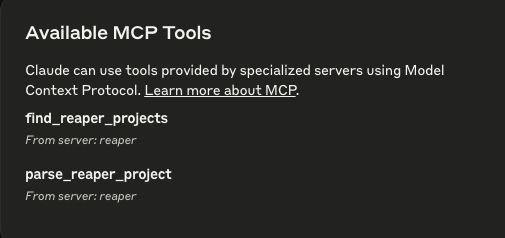
  • find_reaper_projects: Finds all Reaper projects in the directory you specified in the config.
  • parse_reaper_project: Parses a Reaper project and returns a JSON object.

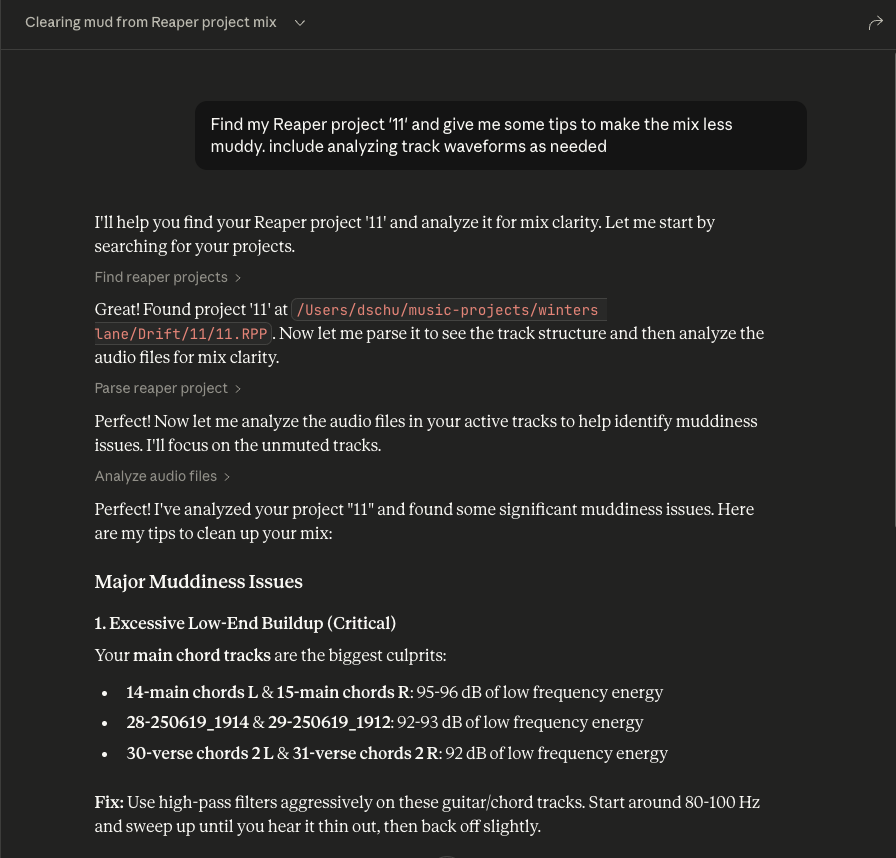
These tools work in tandem. When you ask Claude a question about a specific Reaper project, it will use the find_reaper_projects tool to find the project, then use the parse_reaper_project tool to parse the project and answer your question. To see all data that is parsed from the project, check out the src/domains/reaper_dataclasses.py file.

Setup

  1. Install Dependencies

    uv venv
    source .venv/bin/activate
    
    uv pip install .
  2. Configure Claude Desktop

    • Follow the instructions to configure Claude Desktop for use with a custom MCP server
    • Find the sample config in setup/claude_desktop_config.json
    • Update the following paths in the config:
      • Your uv installation path
      • Your Reaper project directory
      • This server's directory
  3. Launch and Configure

    • Open Claude Desktop
    • Look for the hammer icon in the bottom right of your chat box
    • Click the hammer icon to verify you see two Reaper tools available:
      • find_reaper_projects
      • parse_reaper_project

    Claude Desktop Tools

  4. Ask Away!

    • Ask questions about your Reaper project
    • Always include the name of the specific Reaper project you're asking about
    • You can expand the tool boxes to see the raw project data being passed to Claude Claude Desktop Tools
reaper-mcp-server FAQ

How do I install the reaper-mcp-server?
Install dependencies using a Python virtual environment and pip as described in the setup instructions.
How does the server find Reaper projects?
It uses the find_reaper_projects tool to scan configured directories for Reaper project files.
What format does the server use to represent Reaper projects?
It parses projects into JSON objects using the parse_reaper_project tool for structured data access.
How do I connect the reaper-mcp-server to an MCP client?
Configure your MCP client, such as Claude Desktop, to communicate with the server following the MCP protocol setup guides.
Can I see all parsed data from a Reaper project?
Yes, the parsed data structure is defined in the src/domains/reaper_dataclasses.py file in the server repository.
What MCP clients are compatible with this server?
It works with any MCP client supporting the protocol, including Claude Desktop, GPT-4, and Gemini.
Is the server limited to specific Reaper project versions?
The server parses standard Reaper project files; compatibility depends on the project file format supported by the parser.
Can I extend the server with additional tools?
Yes, the server architecture allows adding more tools to enhance project interaction capabilities.