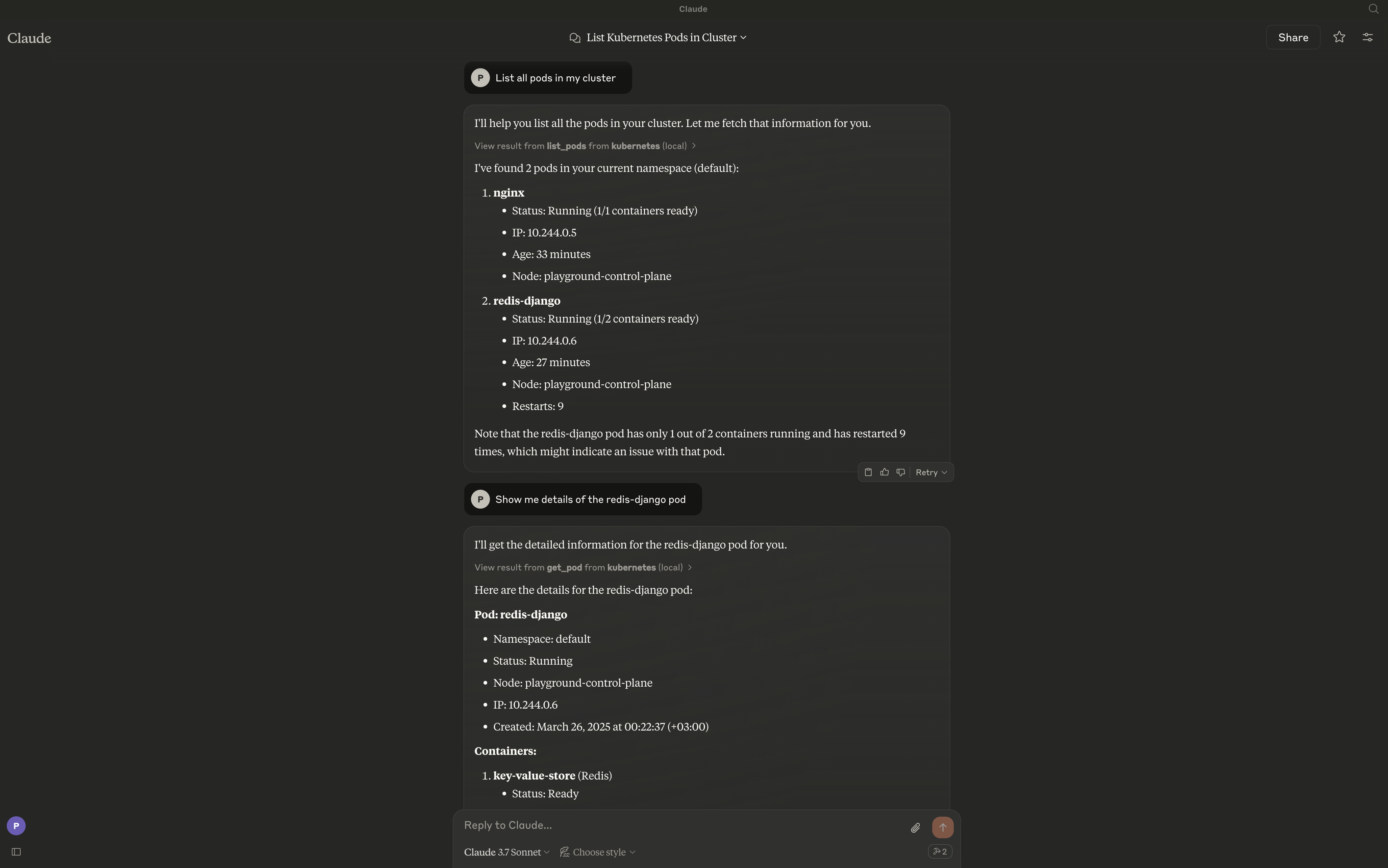
A Model Context Protocol (MCP) server for managing a Kubernetes cluster through llms like Claude.
This Kubernetes MCP server provides a bridge between large language models (LLMs) and Kubernetes clusters, enabling users to interact with their Kubernetes resources through natural language. The server exposes a comprehensive set of tools for managing clusters, namespaces, pods, deployments, services, and other Kubernetes resources.
Cluster Management
- Connect to a Kubernetes cluster
- List all clusters in kubeconfig
- Switch between clusters
- Get cluster information
- Check cluster health
Namespace Operations
- List all namespaces
- Create a namespace
- Get namespace details
- Delete a namespace
- Update namespace labels/annotations
Pod Operations
-
Create pods
Details
- Basic pod creation with image and name
- Pod creation with environment variables
- Pod creation with volume mounts
- Pod creation with resource limits/requests
- Pod creation with node selectors
-
List pods
Details
- List pods in current namespace
- List pods across all namespaces
- List pods with label selectors
- List pods with field selectors
- Limit number of pods listed
-
Get pod details
Details
- Get basic pod information
- Get pod status
- Get pod IP and node information
-
Delete pods
Details
- Delete pod by name
- Force delete pods
-
Get logs from pods
Details
- Stream logs from a specific container
- Get logs with tail lines limit
- Get logs from previous container instance
- Get logs since a specific time
Deployment Operations
-
Create deployments
Details
- Basic deployment with image and name
- Deployment with replica count
- Deployment with labels
- Deployment with environment variables
- Deployment with container ports
- Deployment with image pull policy/secrets
-
List deployments
Details
- List deployments in current namespace
- List deployments across all namespaces
- List deployments with label selectors
-
Get deployment details
Details
- Get basic deployment information
- Get deployment status
- Get deployment scaling information
-
Update deployments
Details
- Scale deployments (change replica count)
- Update deployment images
- Update deployment configuration
- Rollout restart
-
Delete deployments
Details
- Delete deployment by name
- Cascade delete (with or without dependent resources)
Service Operations
-
Create services
Details
- Create ClusterIP service
- Create NodePort service
- Create LoadBalancer service
- Create ExternalName service
- Create headless service
-
List services
Details
- List services in current namespace
- List services across all namespaces
- List services with label selectors
-
Get service details
Details
- Get service endpoints
- Get service ports
- Get service selectors
-
Delete services
Details
- Delete service by name
Ingress Operations
-
Create ingress
Details
- Create basic ingress with host and path
- Create ingress with TLS
- Create ingress with annotations
-
List ingresses
Details
- List ingresses in current namespace
- List ingresses across all namespaces
-
Get ingress details
-
Update ingress
-
Delete ingress
ConfigMap & Secret Operations
-
Create ConfigMaps
Details
- Create from literal values
- Create from files
-
List ConfigMaps
-
Get ConfigMap details
-
Update ConfigMaps
-
Delete ConfigMaps
-
Create Secrets
Details
- Create generic secrets
- Create TLS secrets
- Create Docker registry secrets
-
List Secrets
-
Get Secret details
-
Update Secrets
-
Delete Secrets
Job & CronJob Operations
-
Create Jobs
Details
- Create basic job
- Create job with completion/parallelism
-
List Jobs
-
Get Job details
-
Delete Jobs
-
Create CronJobs
Details
- Create with schedule
- Create with suspend option
-
List CronJobs
-
Get CronJob details
-
Delete CronJobs
Node Operations
-
List all nodes
-
Get node details
Details
- Get node capacity/allocatable resources
- Get node conditions
- Get node labels/taints
-
Cordon/Uncordon nodes
-
Drain nodes
Utility Operations
-
Port forwarding
Details
- Port forward to a pod
- Port forward to a service
-
Get Kubernetes events
Details
- Get cluster-wide events
- Get namespace events
- Get events for a specific resource
-
kubectl explain support
Details
- Get resource documentation
- Get field documentation
-
kubectl api-resources support
Details
- List all available API resources
- Get API resource details
Persistent Volume Operations
- Create PersistentVolumes
- List PersistentVolumes
- Get PersistentVolume details
- Delete PersistentVolumes
- Create PersistentVolumeClaims
- List PersistentVolumeClaims
- Get PersistentVolumeClaim details
- Delete PersistentVolumeClaims
RBAC Operations
- Create/List/Get/Delete ServiceAccounts
- Create/List/Get/Delete Roles
- Create/List/Get/Delete RoleBindings
- Create/List/Get/Delete ClusterRoles
- Create/List/Get/Delete ClusterRoleBindings
Custom Resource Operations
- List custom resource definitions
- Get custom resource definition details
- List custom resources of a specific type
- Create/Get/Update/Delete custom resources
The server will by default connect to your current context. Make sure you have:
Access to a Kubernetes cluster configured for kubectl (e.g. minikube, Rancher Desktop, EKS, GKE, etc.)
To install the Kubernetes MCP server, run:
go install github.com/basebandit/kai/cmd/kaicode ~/Library/Application\ Support/Claude/claude_desktop_config.json
Add the server to your Claude for Desktop configuration by editing claude_desktop_config.json:
{
  "mcpServers": {
    "kubernetes": {
      "command": "/path/to/kubernetes-mcp-server-binary"
    }
  }
}