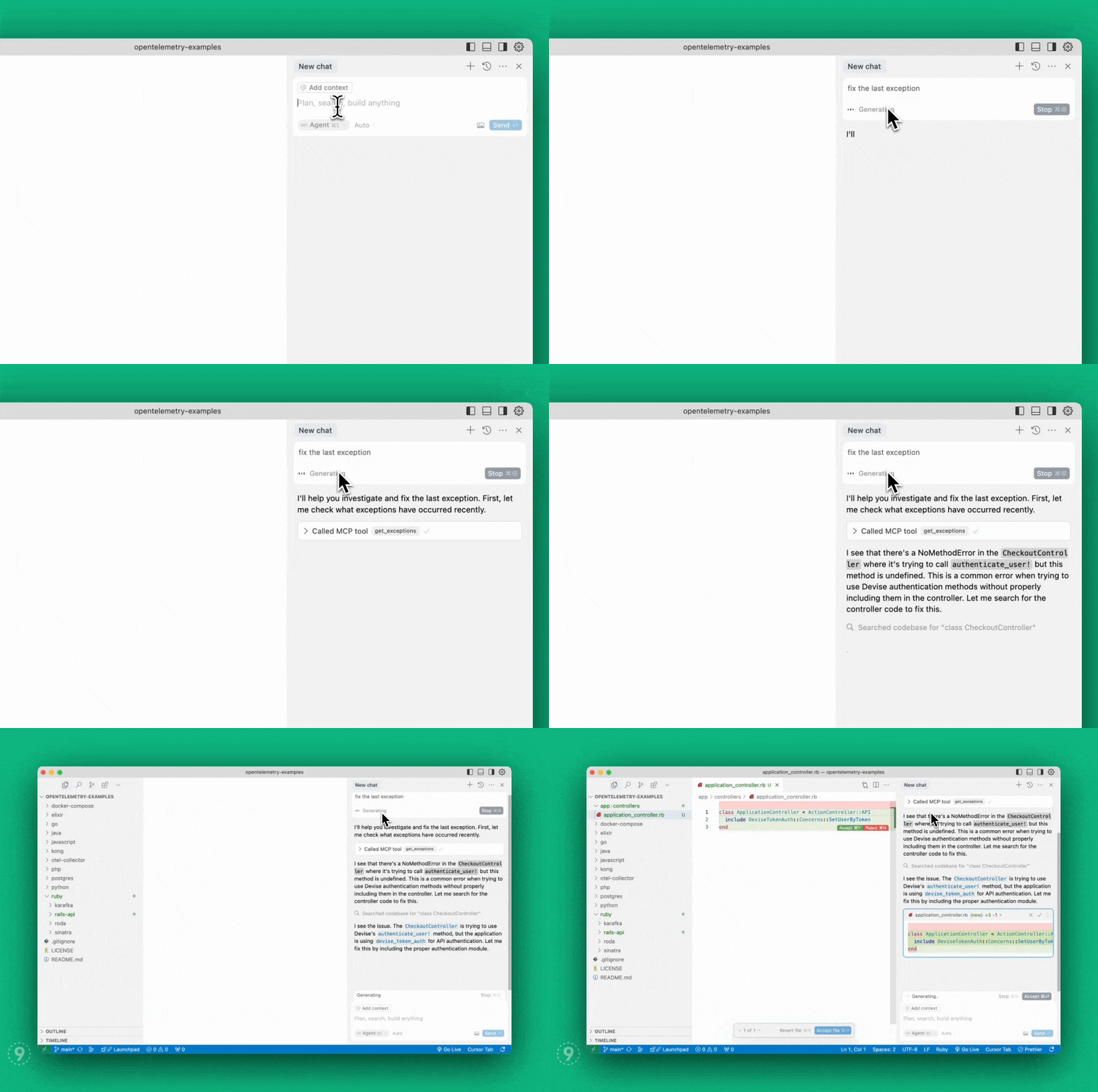
A Model Context Protocol server implementation for Last9 that enables AI agents to seamlessly bring real-time production context — logs, metrics, and traces — into your local environment to auto-fix code faster.
- View demo
- Read our announcement blog post
Works with Claude desktop app, or Cursor, Windsurf, and VSCode (Github Copilot) IDEs. Implements the following MCP tools:
get_exceptions: Get the list of exceptions.get_service_graph: Get service graph for an endpoint from the exception.get_logs: Get logs filtered by service name and/or severity level.get_drop_rules: Get drop rules for logs that determine what logs get filtered out at Last9 Control Planeadd_drop_rule: Create a drop rule for logs at Last9 Control Plane
Retrieves server-side exceptions over a specified time range.
Parameters:
limit(integer, optional): Maximum number of exceptions to return. Default: 20.lookback_minutes(integer, recommended): Number of minutes to look back from now. Default: 60. Examples: 60, 30, 15.start_time_iso(string, optional): Start time in ISO format (YYYY-MM-DD HH:MM:SS). Leave empty to use lookback_minutes.end_time_iso(string, optional): End time in ISO format (YYYY-MM-DD HH:MM:SS). Leave empty to default to current time.span_name(string, optional): Name of the span to filter by.
Gets the upstream and downstream services for a given span name, along with the throughput for each service.
Parameters:
span_name(string, required): Name of the span to get dependencies for.lookback_minutes(integer, recommended): Number of minutes to look back from now. Default: 60. Examples: 60, 30, 15.start_time_iso(string, optional): Start time in ISO format (YYYY-MM-DD HH:MM:SS). Leave empty to use lookback_minutes.
Gets logs filtered by optional service name and/or severity level within a specified time range.
Parameters:
service(string, optional): Name of the service to get logs for.severity(string, optional): Severity of the logs to get.lookback_minutes(integer, recommended): Number of minutes to look back from now. Default: 60. Examples: 60, 30, 15.start_time_iso(string, optional): Start time in ISO format (YYYY-MM-DD HH:MM:SS). Leave empty to use lookback_minutes.end_time_iso(string, optional): End time in ISO format (YYYY-MM-DD HH:MM:SS). Leave empty to default to current time.limit(integer, optional): Maximum number of logs to return. Default: 20.
Gets drop rules for logs, which determine what logs get filtered out from reaching Last9.
Adds a new drop rule to filter out specific logs at Last9 Control Plane
Parameters:
name(string, required): Name of the drop rule.filters(array, required): List of filter conditions to apply. Each filter has:key(string, required): The key to filter on. Only attributes and resource.attributes keys are supported. For resource attributes, use format: resource.attributes[key_name] and for log attributes, use format: attributes[key_name] Double quotes in key names must be escaped.value(string, required): The value to filter against.operator(string, required): The operator used for filtering. Valid values:- "equals"
- "not_equals"
conjunction(string, required): The logical conjunction between filters. Valid values:- "and"
You can install the Last9 Observability MCP server using either:
# Add the Last9 tap
brew tap last9/tap

# Install the Last9 MCP CLI
brew install last9-mcp
# Install globally
npm install -g @last9/mcp-server

# Or run directly with npx
npx @last9/mcp-serverThe Last9 MCP server requires the following environment variables:
LAST9_BASE_URL: (required) Last9 API URL from OTel integrationLAST9_AUTH_TOKEN: (required) Authentication token for Last9 MCP server from OTel integrationLAST9_REFRESH_TOKEN: (required) Refresh Token with Write permissions, needed for accessing control plane APIs from API Access
Configure the Claude app to use the MCP server:
- Open the Claude Desktop app, go to Settings, then Developer
- Click Edit Config
- Open the
claude_desktop_config.jsonfile - Copy and paste the server config to your existing file, then save
- Restart Claude
{
  "mcpServers": {
    "last9": {
      "command": "/opt/homebrew/bin/last9-mcp",
      "env": {
        "LAST9_BASE_URL": "<last9_otlp_host>",
        "LAST9_AUTH_TOKEN": "<last9_otlp_auth_token>",
        "LAST9_REFRESH_TOKEN": "<last9_write_refresh_token>"
      }
    }
  }
}Configure Cursor to use the MCP server:
- Open Cursor, go to Settings, then Cursor Settings
- Select MCP on the left
- Click Add "New Global MCP Server" at the top right
- Copy and paste the server config to your existing file, then save
- Restart Cursor
{
  "mcpServers": {
    "last9": {
      "command": "/opt/homebrew/bin/last9-mcp",
      "env": {
        "LAST9_BASE_URL": "<last9_otlp_host>",
        "LAST9_AUTH_TOKEN": "<last9_otlp_auth_token>",
        "LAST9_REFRESH_TOKEN": "<last9_write_refresh_token>"
      }
    }
  }
}Configure Windsurf to use the MCP server:
- Open Windsurf, go to Settings, then Developer
- Click Edit Config
- Open the
windsurf_config.jsonfile - Copy and paste the server config to your existing file, then save
- Restart Windsurf
{
  "mcpServers": {
    "last9": {
      "command": "/opt/homebrew/bin/last9-mcp",
      "env": {
        "LAST9_BASE_URL": "<last9_otlp_host>",
        "LAST9_AUTH_TOKEN": "<last9_otlp_auth_token>",
        "LAST9_REFRESH_TOKEN": "<last9_write_refresh_token>"
      }
    }
  }
}Note: MCP support in VS Code is available starting v1.99 and is currently in preview. For advanced configuration options and alternative setup methods, view the VS Code MCP documentation.
- Open VS Code, go to Settings, select the User tab, then Features, then Chat
- Click "Edit settings.json"
- Copy and paste the server config to your existing file, then save
- Restart VS Code
{
  "mcp": {
    "servers": {
      "last9": {
        "type": "stdio",
        "command": "/opt/homebrew/bin/last9-mcp",
        "env": {
          "LAST9_BASE_URL": "<last9_otlp_host>",
          "LAST9_AUTH_TOKEN": "<last9_otlp_auth_token>",
          "LAST9_REFRESH_TOKEN": "<last9_write_refresh_token>"
        }
      }
    }
  }
}