Fire in da houseTop Tip:Paying $100+ per month for Perplexity, MidJourney, Runway, ChatGPT and other tools is crazy - get all your AI tools in one site starting at $15 per month with Galaxy AI Fire in da houseCheck it out free

local-api-mcp-python

MCP.Pizza Chef: AdsPower

local-api-mcp-python is an MCP server that integrates with the AdsPower LocalAPI, allowing LLMs to programmatically start browsers, create browser instances, and update browser fingerprint configurations. It facilitates seamless interaction between language models and browser automation for tasks like managing Android UA browsers and customizing browser fingerprints. Requires Python 3.10+ and AdsPower installation.

Use This MCP server To

Create and manage browser instances via natural language commands Update browser fingerprint configurations dynamically Automate browser startup and control through LLMs Integrate AdsPower browser automation into AI workflows Enable LLM-driven browser environment customization Use with Claude Desktop or Cursor for interactive browser control

README

AdsPower LocalAPI MCP Server Python

A Model Context Protocol server that AdsPower browser LocalAPI. This server enables LLMs to interact with start browser, create browser, update browser fingerprint config ...

Usage with Claude Desktop

Talk to LLMs to create browser: Create an Android UA browser using Chrome 134
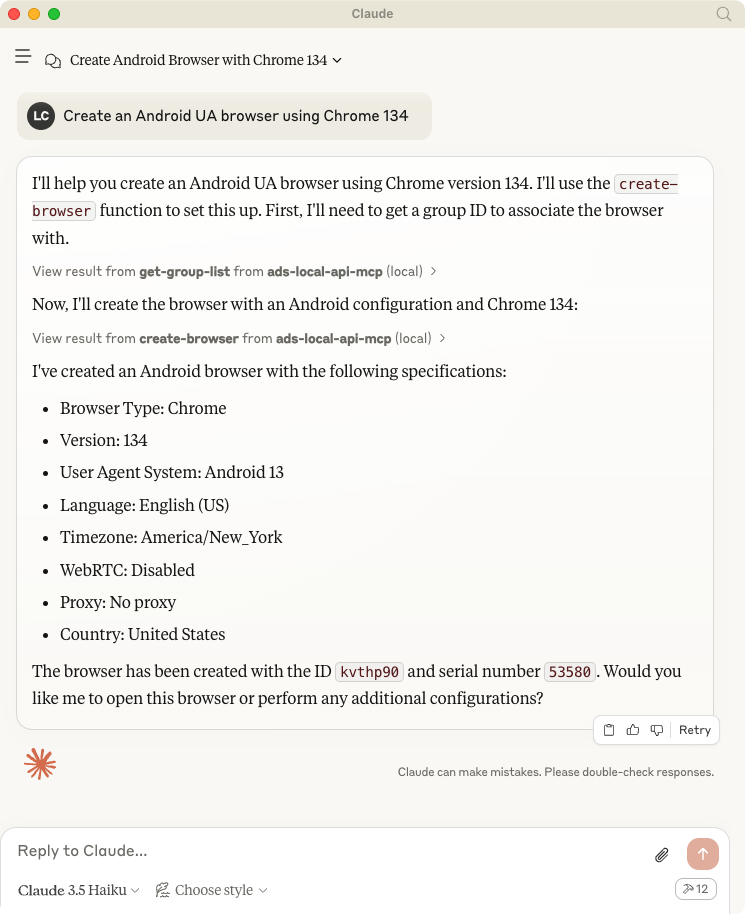
Claude desktop

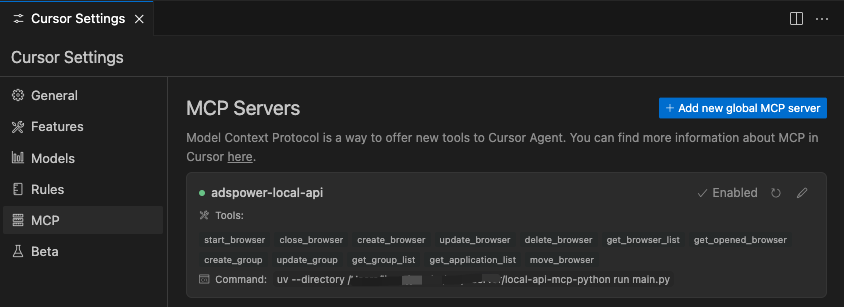
Usage width Cursor

Cursor

System requirements

  • AdsPower
  • Python 3.10 or higher installed.

Set up your environment, install uv

First, let’s install uv and set up our Python project and environment:

MacOS / Linux
curl -LsSf https://astral.sh/uv/install.sh | sh
Windows
powershell -ExecutionPolicy ByPass -c "irm https://astral.sh/uv/install.ps1 | iex"

Development

# git clone 
git clone https://github.com/AdsPower/local-api-mcp-python.git

# cd
cd local-api-mcp-python

# venv
uv venv
source .venv/bin/activate

# Install dependencies
uv pip install .

To use with Claude Desktop, add the server config:

On macOS: ~/Library/Application Support/Claude/claude_desktop_config.json On Windows: %APPDATA%/Claude/claude_desktop_config.json

# Add the server to your claude_desktop_config.json
{
    "mcpServers": {
        "adspower-local-api": {
        "command": "uv",
        "args": [
            "--directory",
            "<Replace Your Project Path>/local-api-mcp-python",
            "run",
            "main.py"
        ]
        }
    }
}

local-api-mcp-python FAQ

How do I install the local-api-mcp-python server?
Clone the GitHub repo, install Python 3.10+, then set up the environment using uv as per instructions.
What system requirements are needed?
You need AdsPower installed and Python 3.10 or higher on your machine.
Can I use this MCP server with different LLM hosts?
Yes, it works with any MCP host like Claude Desktop or Cursor that supports MCP protocol.
How does this server interact with AdsPower?
It exposes AdsPower LocalAPI functions to LLMs, enabling browser creation and fingerprint updates via natural language.
Is this server limited to specific browsers?
It primarily supports browsers managed by AdsPower, including Android UA browsers with Chrome engines.
What programming languages are required to use this server?
The server is implemented in Python and requires Python 3.10+, but LLMs interact via MCP protocol, no coding needed for usage.
How do I start a browser with a specific user agent?
Use natural language commands like 'Create an Android UA browser using Chrome 134' through your MCP host connected to this server.
Can I customize browser fingerprints dynamically?
Yes, the server allows updating fingerprint configurations on the fly via LLM commands.