
Fire in da houseTop Tip:Paying $100+ per month for Perplexity, MidJourney, Runway, ChatGPT and other tools is crazy - get all your AI tools in one site starting at $15 per month with Galaxy AI Fire in da houseCheck it out free

Log-Analyzer-with-MCP

MCP.Pizza Chef: awslabs

Log-Analyzer-with-MCP is a Model Context Protocol server that provides AI assistants seamless access to AWS CloudWatch Logs. It enables browsing, searching, and correlating log data in real time, empowering AI models to analyze operational logs effectively. This server standardizes log data exposure to LLMs, facilitating advanced troubleshooting and monitoring workflows within AWS environments.

Use This MCP server To

Search and analyze AWS CloudWatch Logs via AI assistants Correlate log events across multiple CloudWatch Log Groups Enable AI-driven troubleshooting using real-time log data Automate log data extraction for incident investigation Integrate CloudWatch Logs into AI-enhanced monitoring workflows Provide structured log context to LLMs for operational insights

README

Log Analyzer with MCP

A Model Context Protocol (MCP) server that provides AI assistants access to AWS CloudWatch Logs for analysis, searching, and correlation.
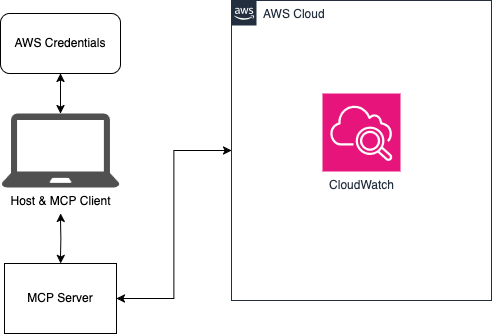
🏗️ Architecture

Architecture Diagram

🔌 Model Context Protocol (MCP)

As outlined by Anthropic:

MCP is an open protocol that standardizes how applications provide context to LLMs. Think of MCP like a USB-C port for AI applications. Just as USB-C provides a standardized way to connect your devices to various peripherals and accessories, MCP provides a standardized way to connect AI models to different data sources and tools.

This repository is an example client and server that allows an AI assistant like Claude to interact with CloudWatch logs in an AWS account. To learn more about MCP, read through the introduction.

✨ Features

  • Browse and search CloudWatch Log Groups
  • Search logs using CloudWatch Logs Insights query syntax
  • Generate log summaries and identify error patterns
  • Correlate logs across multiple AWS services
  • AI-optimized tools for assistants like Claude

Detailed feature list

🚀 Installation

Prerequisites

  • The uv Python package and project manager
  • An AWS account with CloudWatch Logs
  • Configured AWS credentials

Setup

# Clone the repository
git clone https://github.com/awslabs/Log-Analyzer-with-MCP.git
cd Log-Analyzer-with-MCP

# Create a virtual environment and install dependencies
uv sync
source .venv/bin/activate  # On Windows, use `.venv\Scripts\activate`

🚦 Quick Start

  1. Make sure to have configured your AWS credentials as described here

  2. Update your claude_desktop_config.json file with the proper configuration outlined in the AI integration guide

  3. Open Claude for Desktop and start chatting!

For more examples and advanced usage, see the detailed usage guide.

🤖 AI Integration

This project can be easily integrated with AI assistants like Claude for Desktop. See the AI integration guide for details.

📚 Documentation

  • Detailed Features
  • Usage Guide
  • AWS Configuration
  • Architecture Details
  • AI Integration
  • Troubleshooting

🔒 Security

See CONTRIBUTING for more information.

📄 License

This project is licensed under the Apache-2.0 License.

Log-Analyzer-with-MCP FAQ

How does Log-Analyzer-with-MCP connect to AWS CloudWatch?
It uses AWS SDK credentials configured in the environment to securely access CloudWatch Logs.
Can this MCP server handle large volumes of log data?
Yes, it supports efficient querying and pagination to manage extensive CloudWatch log datasets.
Is the server compatible with multiple AI models?
Yes, it follows the MCP standard, making it compatible with models like OpenAI GPT, Anthropic Claude, and Google Gemini.
How is data security maintained when accessing logs?
Access is controlled via AWS IAM roles and policies, ensuring secure and scoped permissions.
Can I customize the log search queries?
Yes, the server supports flexible search parameters to tailor log retrieval to specific needs.
Does it support real-time log updates?
It can fetch recent logs on demand but does not stream logs in real time.
How do I deploy this MCP server?
Deployment typically involves running the server in an environment with AWS credentials and network access to CloudWatch.
What troubleshooting capabilities does it enable?
It allows AI models to correlate and analyze logs for root cause analysis and incident resolution.