


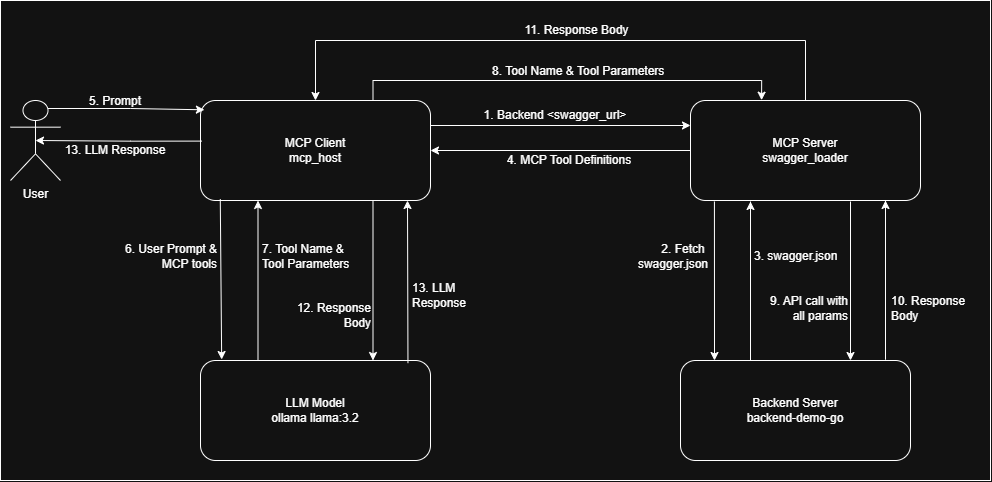
swagger-mcp is a tool designed to scrape Swagger UI by extracting the swagger.json file and dynamically generating well-defined mcp tools at runtime. These tools can be utilized by the MCP client for further tool selection.
Check out demo video showcasing the project in action:

If you find this project valuable, please support me on LinkedIn by:
- 👍 Liking and sharing our demo post
- 💬 Leaving your thoughts and feedback in the comments
- 🔗 Connecting with me for future updates
Your support on LinkedIn will help me reach more people and improve the project!
To use swagger-mcp, ensure you have the following dependencies:
- LLM Model API Key / Local LLM: Requires access to OpenAI, Claude, or Ollama models.
- Any MCP Client: (Used mark3labs - mcphost)
Follow these steps to install and run swagger-mcp:
go install github.com/danishjsheikh/swagger-mcp@latest
swagger-mcpTo run swagger-mcp directly, use:
swagger-mcp --specUrl=https://your_swagger_api_docs.jsonMain flags:
--specUrl: Swagger/OpenAPI JSON URL (required)--sseMode: Run in SSE mode (default: false, if true runs as SSE server, otherwise uses stdio)--sseAddr: SSE server listen address in IP:Port or :Port format (if empty, will use IP:Port from --sseUrl)--sseUrl: SSE server base URL (if empty, will use sseAddr to generate, e.g. http://IP:Port or http://localhost:Port)- If both --sseAddr and --sseUrl are set, they are used as-is without auto-complement.
--baseUrl: Override base URL for API requests--security: API security type (basic,apiKey, orbearer)--basicAuth: Basic auth in user:password format--bearerAuth: Bearer token for Authorization header--apiKeyAuth: API key(s), formatpassAs:name=value(e.g.header:token=abc,query:user=foo,cookie:sid=xxx)- See main.go for all supported flags and options.
To integrate with mcphost, include the following configuration in .mcp.json:
{
    "mcpServers":
    {
        "swagger_loader": {
            "command": "swagger-mcp",
            "args": ["--specUrl=<swagger/doc.json_url>"]
        }
    }
}-
Some Backend:
go install github.com/danishjsheikh/go-backend-demo@latest
go-backend-demo
-
Ollama
ollama run llama3.2
-
MCP Client
go install github.com/mark3labs/mcphost@latest
mcphost -m ollama:llama3.2 --config <.mcp.json_file_path>
I am working on improving tool definitions to enhance:
✅ Better error handling for more accurate responses
✅ LLM behavior control to ensure it relies only on API responses and does not use its own memory
✅ Preventing hallucinations and random data generation by enforcing strict data retrieval from APIs
If you have insights or suggestions on improving these aspects, please contribute by:
- Sharing your experience with similar implementations
- Suggesting modifications to tool definitions
- Providing feedback on current limitations
Your input will be invaluable in making this tool more reliable and effective! 🚀