




Fire in da houseTop Tip:Paying $100+ per month for Perplexity, MidJourney, Runway, ChatGPT and other tools is crazy - get all your AI tools in one site starting at $15 per month with Galaxy AI Fire in da houseCheck it out free

Mureka-mcp

MCP.Pizza Chef: SkyworkAI

Mureka-mcp is an MCP server that provides powerful APIs for generating lyrics, songs, and instrumental background music. It integrates with MCP clients like Claude Desktop and OpenAI Agents, enabling real-time creative music generation workflows. This server facilitates seamless interaction with AI-driven music composition tools, making it ideal for developers and creators looking to automate or enhance music production using the Model Context Protocol.

Use This MCP server To

Generate song lyrics based on user prompts Create instrumental background music automatically Combine lyrics and music generation in creative workflows Integrate AI music generation into chat or assistant apps Produce custom soundtracks for videos or games Enable real-time music creation in collaborative platforms

README

export

Discord Community Twitter PyPI

Official Mureka Model Context Protocol (MCP) server that enables interaction with powerful lyrics, song and bgm generating APIs. This server allows MCP clients like Claude Desktop, OpenAI Agents and others to generate lyrics, song and background music(instrumental).

Quickstart with Claude Desktop

  1. Get your API key from Mureka.
  2. Install uv (Python package manager), install with curl -LsSf https://astral.sh/uv/install.sh | sh or see the uv repo for additional install methods.
  3. Go to Claude > Settings > Developer > Edit Config > claude_desktop_config.json to include the following:
{
    "mcpServers": {
        "Mureka": {
            "command": "uvx",
            "args": [
                "mureka-mcp"
            ],
            "env": {
                "MUREKA_API_KEY": "<insert-your-api-key-here>",
                "MUREKA_API_URL": "https://api.mureka.ai",
                "TIME_OUT_SECONDS":"300"
            }
        }
    }
}

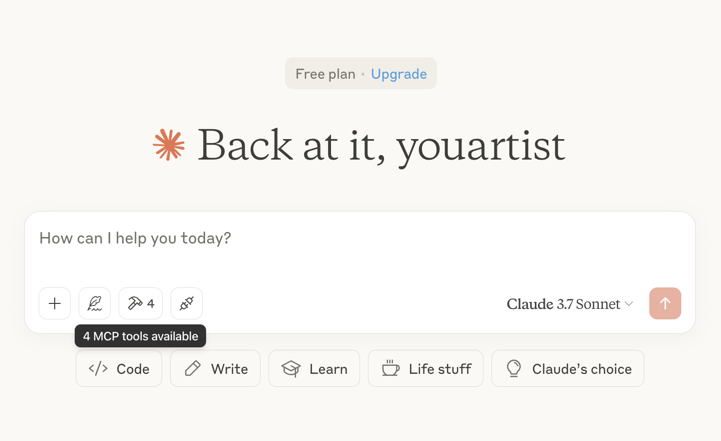
Then restart the Claude app and see 4 MCP tools available in the window, indicating successful loading
Optional features

You can add the TIME_OUT_SECONDS environment variable to the claude_desktop_config.json to set the timeout period for song or bgm generation waiting(Default 60s).

Example usage

⚠️ Warning: Mureka credits are needed to use these tools. Try asking Claude:

  • "Please create a song for my daughter Jessica to wish her a happy birthday and play it"
  • "Please generate lyrics about Christmas"
  • "Please generate a song based on the lyrics just now"
  • "Please generate background music suitable for playing in the coffee shop"

bgm 1 download

bgm 2 download

Troubleshooting

Logs when running with Claude Desktop can be found at:

  • Windows: %APPDATA%\Claude\logs\mcp-server-Mureka.log
  • macOS: ~/Library/Logs/Claude/mcp-server-Mureka.log

Quickstart with Openai agents sdk

Install Agents SDK

pip install openai-agents

Run example: openapi_agents_example/main.py

Key is required to be filled in:

MUREKA_API_KEY = "<insert-your-api-key-here>"

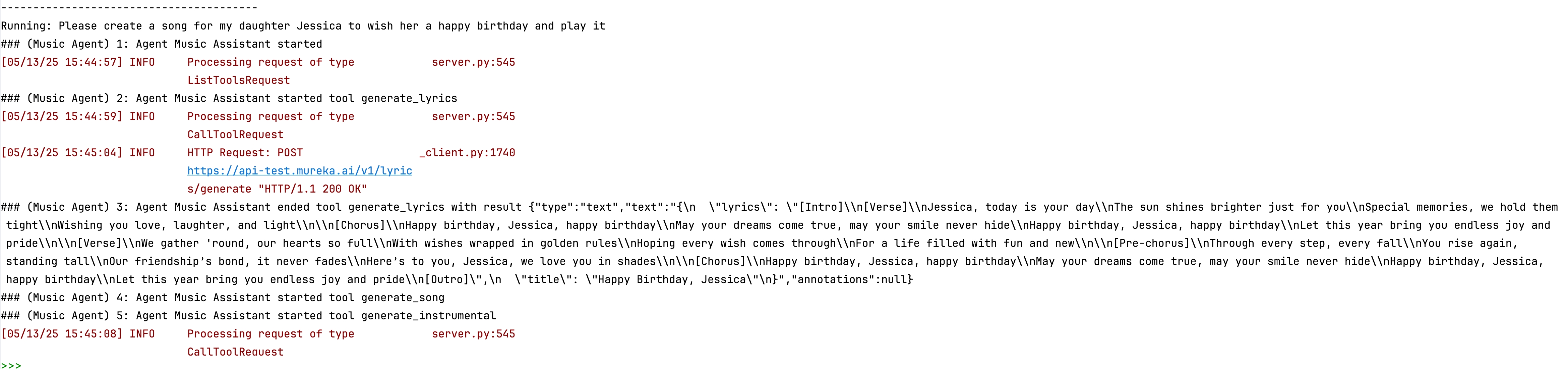
After running, you can see the composition process in the console
Mureka-mcp FAQ

How do I connect Mureka-mcp with my MCP client?
You connect by configuring your MCP client to communicate with the Mureka-mcp server endpoint, enabling API calls for music generation.
What types of music can Mureka-mcp generate?
Mureka-mcp can generate lyrics, songs, and instrumental background music across various genres depending on input prompts.
Can I customize the style or mood of the generated music?
Yes, you can specify style, mood, or theme parameters in your requests to tailor the generated lyrics and music.
Is Mureka-mcp compatible with multiple LLM providers?
Yes, it works with MCP clients that support models like OpenAI, Anthropic Claude, and Google Gemini.
What programming languages can I use to interact with Mureka-mcp?
You can use any language that supports HTTP API calls, such as Python, JavaScript, or others.
Does Mureka-mcp support real-time music generation?
Yes, it supports real-time interaction for generating music and lyrics dynamically during sessions.
Are there any usage limits or rate limits?
Usage limits depend on your deployment and API configuration; check your server settings for details.
How secure is the communication with Mureka-mcp?
Communication security depends on your deployment environment; typically, HTTPS and authentication are recommended.
