





Documentation 🌪️ Read the announcement 🔥 Join Discord
MCP servers allow LLMs like Claude to make HTTP requests, connecting them to APIs & executable code. We built this repo for ourselves & anyone working with data to easily pass any Python code directly to your own desktop Claude app.
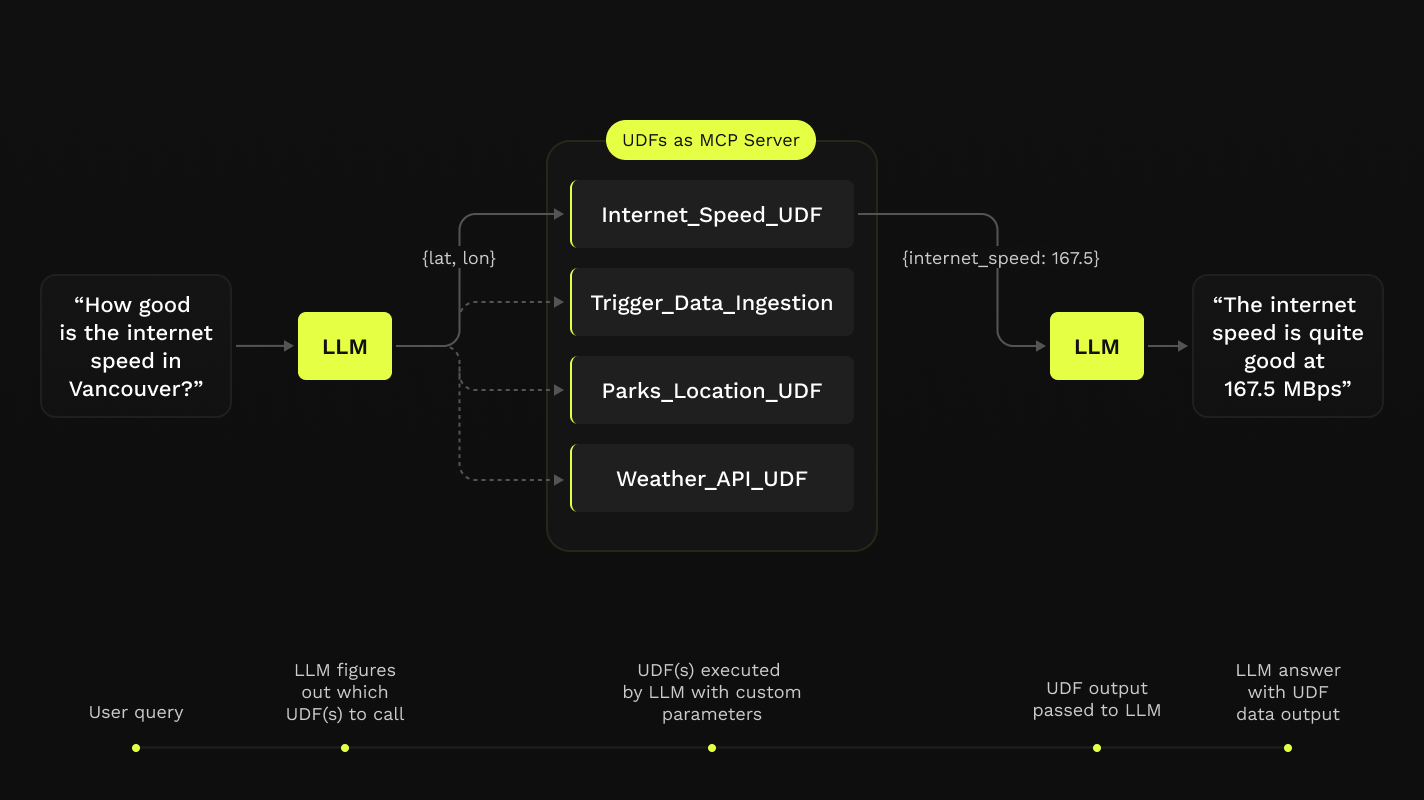
This repo offers a simple step-by-step notebook workflow to setup MCP Servers with Claude's Desktop App, all in Python built on top of Fused User Defined Functions (UDFs).

- Python 3.11
- Latest Claude Desktop app installed (macOS & Windows)
If you're on Linux, the desktop app isn't available so we've made a simple client you can use to have it running locally too!
You do not need a Fused account to do any of this! All of this will be running on your local machine.
-
Clone this repo in any local directory, and navigate to the repo:
git clone https://github.com/fusedio/fused-mcp.git cd fused-mcp/ -
Install
uvif you don't have it:macOS / Linux:
curl -LsSf https://astral.sh/uv/install.sh | shWindows:
powershell -ExecutionPolicy ByPass -c "irm https://astral.sh/uv/install.ps1 | iex" -
Test out the client by asking for its info:
uv run main.py -h
-
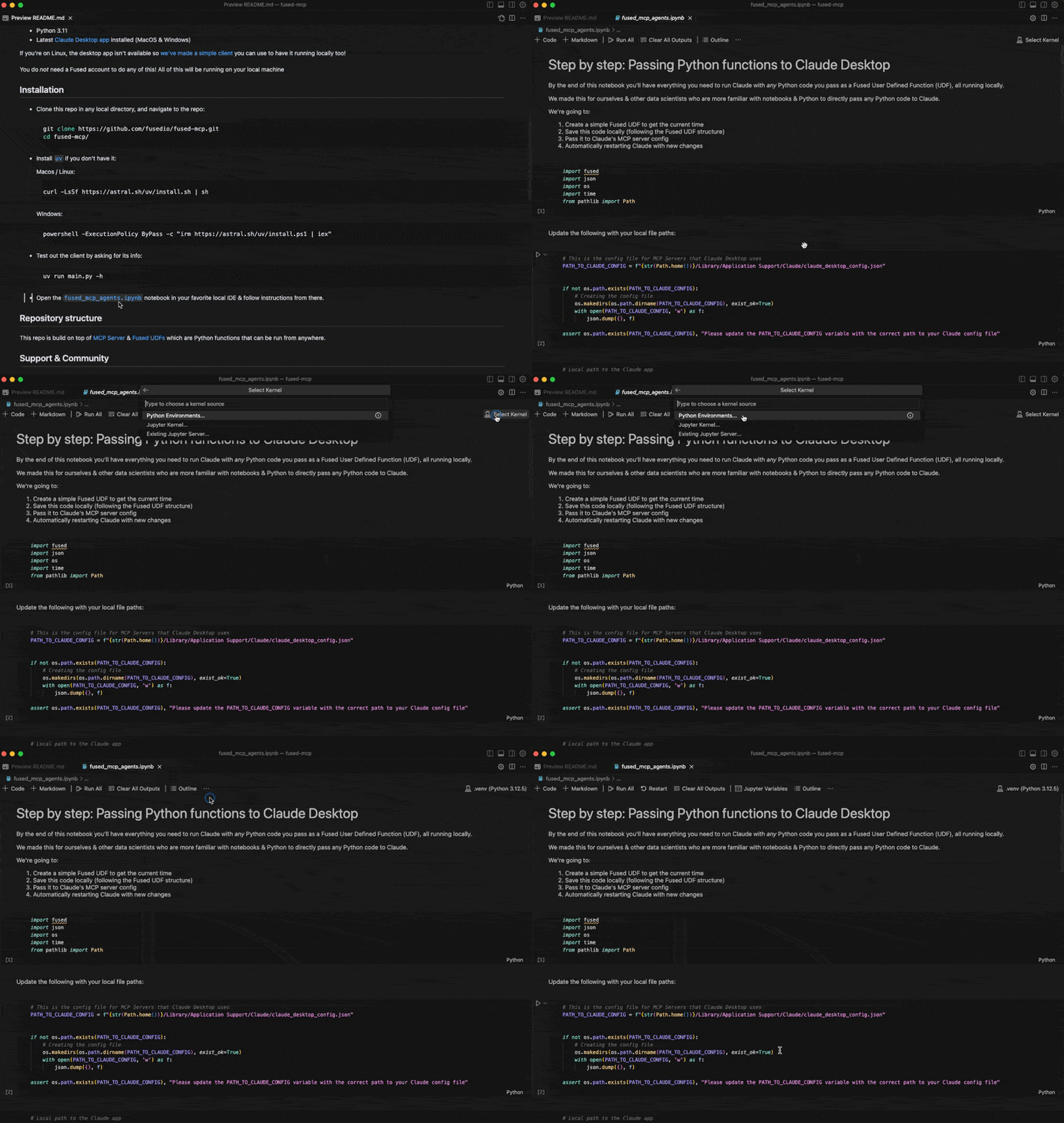
Start by following our getting-started notebook
fused_mcp_agents.ipynbin your favorite local IDE to get set up and then make your way to the more advanced notebook to
This repo is build on top of MCP Server & Fused UDFs which are Python functions that can be run from anywhere.
Feel free to join our Discord server if you want some help getting unblocked!
Here are a few common steps to debug the setup:
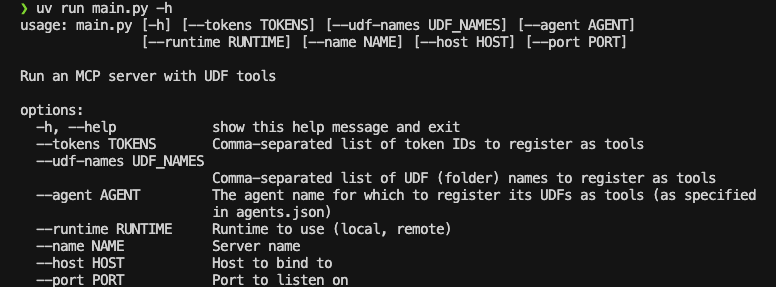
- Running
uv run main.py -hshould return something like this:
- You might need to pass global paths to some functions to the
Claude_Desktop_Config.json. For example, by default we only passuv:
{
    "mcpServers": {
        "qgis": {
            "command": "uv",
            "args": ["..."]
        }

    }
}
But you might need to pass the full path to uv, which you can simply pass to common.generate_local_mcp_config in the notebook:
# in fused_mcp_agents.ipynb
import shutil

common.generate_local_mcp_config(
    config_path=PATH_TO_CLAUDE_CONFIG,
    agents_list = ["get_current_time"],
    repo_path= WORKING_DIR,
    uv_path=shutil.which('uv'),
)
Which would create a config like this:
{
    "mcpServers": {
        "qgis": {
            "command": "/Users/<YOUR_USERNAME>/.local/bin/uv",
            "args": ["..."]
        }

    }
}- If Claude runs without showing any connected tools, take a look at the MCP Docs for troubleshooting the Claude Desktop setup
Feel free to open PRs to add your own UDFs to udfs/ so others can play around with them locally too!
If you are unable to install the Claude Desktop app (e.g., on Linux), we provide a small example local client interface to use Claude with the MCP server configured in this repo:
NOTE: You'll need an API key for Claude here as you won't use the Desktop App
-
Create an Anthropic Console Account
-
Create an Anthropic API Key
-
Create a
.env:touch .env
-
Add your key as
ANTHROPIC_API_KEYinside the.env:# .env ANTHROPIC_API_KEY = "your-key-here" -
Start the MCP server:
uv run main.py --agent get_current_time
-
In another terminal session, start the local client, pointing to the address of the server:
uv run client.py http://localhost:8080/sse