


A Model Context Protocol (MCP) server for Kubernetes that enables AI assistants like Claude, Cursor, and others to interact with Kubernetes clusters through natural language.





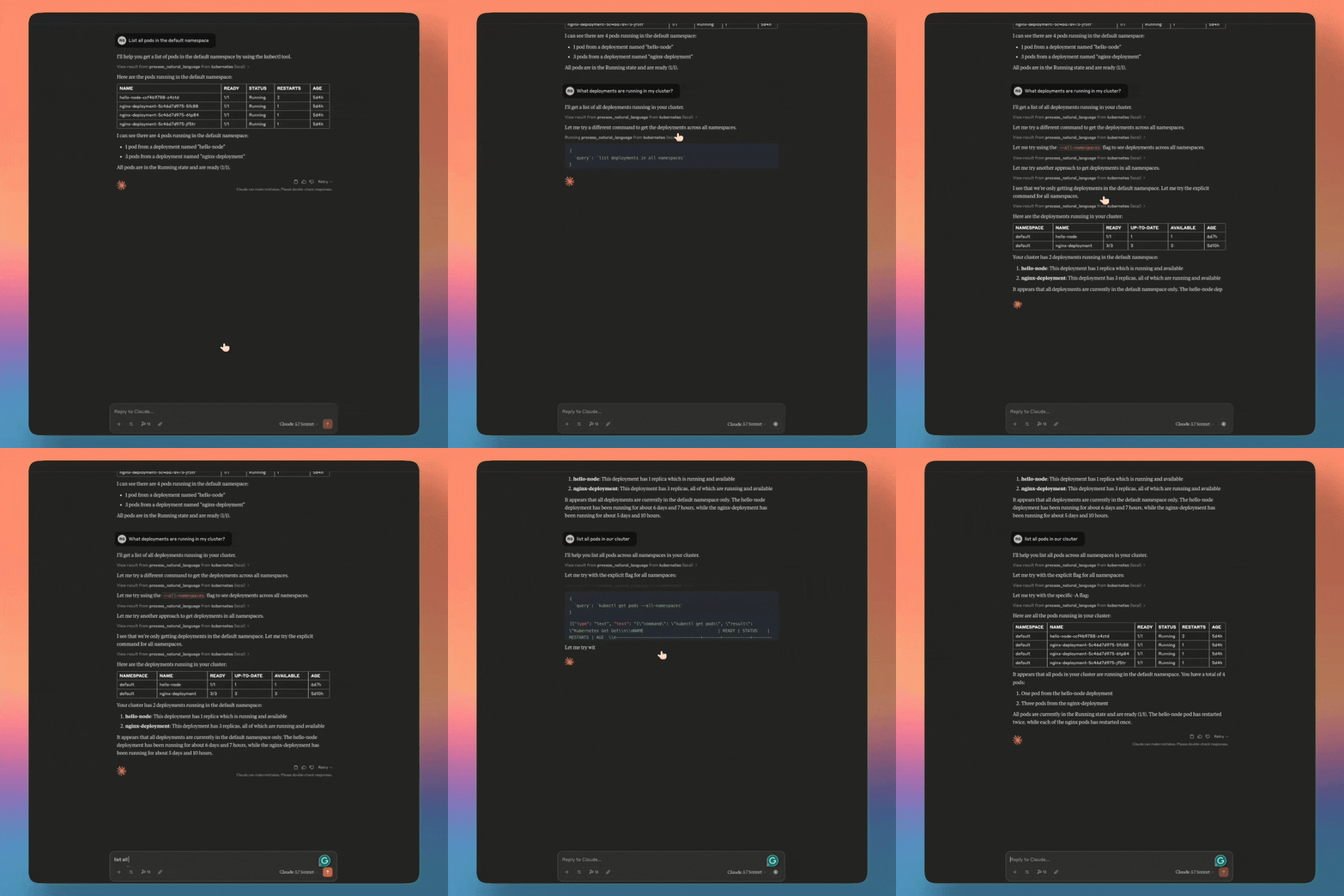
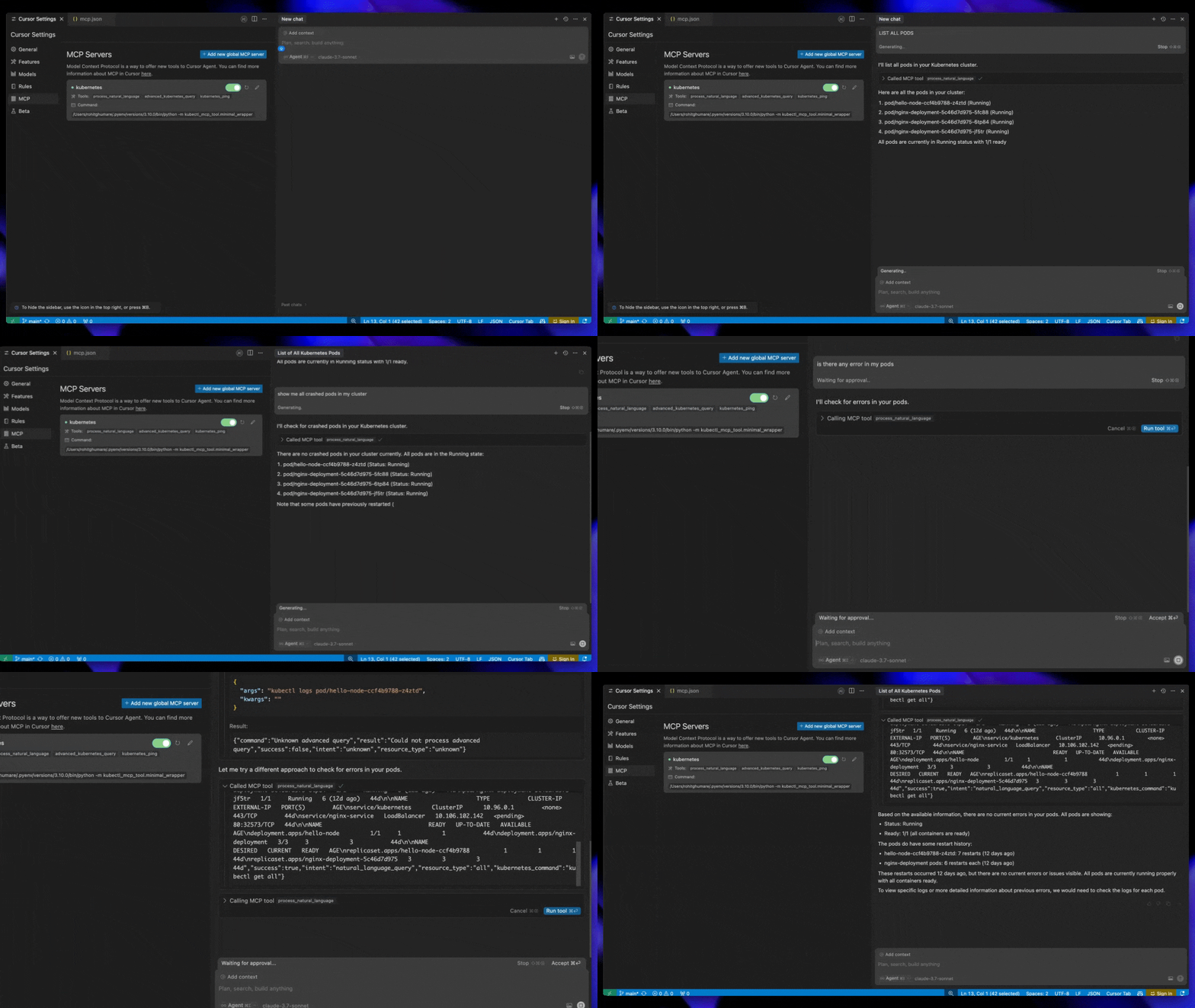
- Connect to a Kubernetes cluster
- List and manage pods, services, deployments, and nodes
- Create, delete, and describe pods and other resources
- Get pod logs and Kubernetes events
- Support for Helm v3 operations (installation, upgrades, uninstallation)
- kubectl explain and api-resources support
- Choose namespace for next commands (memory persistence)
- Port forward to pods
- Scale deployments and statefulsets
- Execute commands in containers
- Manage ConfigMaps and Secrets
- Rollback deployments to previous versions
- Ingress and NetworkPolicy management
- Context switching between clusters
- Process natural language queries for kubectl operations
- Context-aware commands with memory of previous operations
- Human-friendly explanations of Kubernetes concepts
- Intelligent command construction from intent
- Fallback to kubectl when specialized tools aren't available
- Mock data support for offline/testing scenarios
- Namespace-aware query handling
- Cluster health monitoring
- Resource utilization tracking
- Pod status and health checks
- Event monitoring and alerting
- Node capacity and allocation analysis
- Historical performance tracking
- Resource usage statistics via kubectl top
- Container readiness and liveness tracking
- RBAC validation and verification
- Security context auditing
- Secure connections to Kubernetes API
- Credentials management
- Network policy assessment
- Container security scanning
- Security best practices enforcement
- Role and ClusterRole management
- ServiceAccount creation and binding
- PodSecurityPolicy analysis
- RBAC permissions auditing
- Security context validation
- Cluster diagnostics and troubleshooting
- Configuration validation
- Error analysis and recovery suggestions
- Connection status monitoring
- Log analysis and pattern detection
- Resource constraint identification
- Pod health check diagnostics
- Common error pattern identification
- Resource validation for misconfigurations
- Detailed liveness and readiness probe validation
- Multiple transport protocols support (stdio, SSE)
- Integration with multiple AI assistants
- Extensible tool framework
- Custom resource definition support
- Cross-namespace operations
- Batch operations on multiple resources
- Intelligent resource relationship mapping
- Error explanation with recovery suggestions
- Volume management and identification
The Kubectl MCP Tool implements the Model Context Protocol (MCP), enabling AI assistants to interact with Kubernetes clusters through a standardized interface. The architecture consists of:
- MCP Server: A compliant server that handles requests from MCP clients (AI assistants)
- Tools Registry: Registers Kubernetes operations as MCP tools with schemas
- Transport Layer: Supports stdio, SSE, and HTTP transport methods
- Core Operations: Translates tool calls to Kubernetes API operations
- Response Formatter: Converts Kubernetes responses to MCP-compliant responses
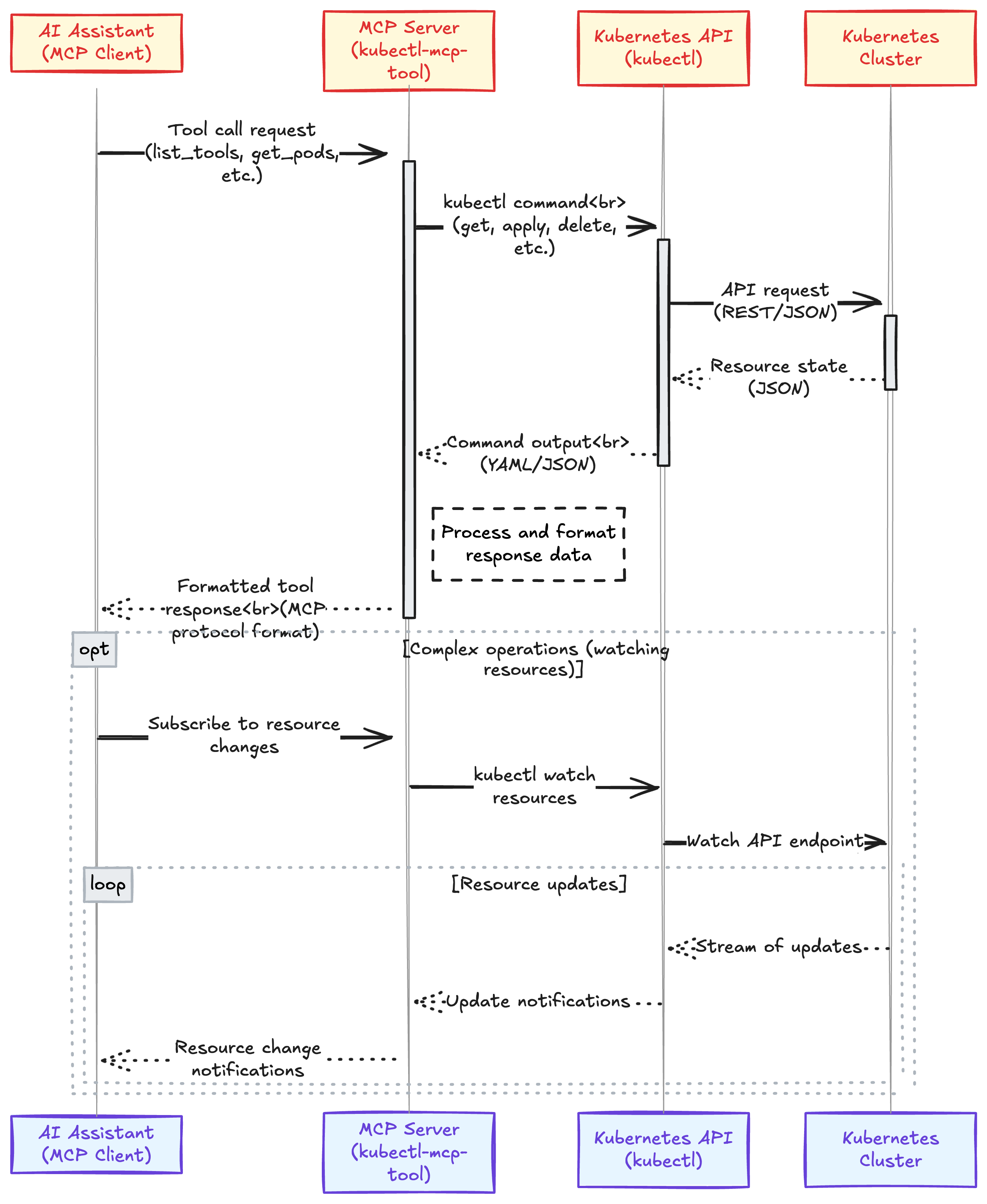
The tool operates in two modes:
- CLI Mode: Direct command-line interface for executing Kubernetes operations
- Server Mode: Running as an MCP server to handle requests from AI assistants
For detailed installation instructions, please see the
You can install kubectl-mcp-tool directly from PyPI:
pip install kubectl-mcp-toolFor a specific version:
pip install kubectl-mcp-tool==1.1.1The package is available on PyPI: https://pypi.org/project/kubectl-mcp-tool/1.1.1/
- Python 3.9+
- kubectl CLI installed and configured
- Access to a Kubernetes cluster
- pip (Python package manager)
# Install latest version from PyPI
pip install kubectl-mcp-tool

# Or install development version from GitHub
pip install git+https://github.com/rohitg00/kubectl-mcp-server.git# Clone the repository
git clone https://github.com/rohitg00/kubectl-mcp-server.git
cd kubectl-mcp-server
# Install in development mode
pip install -e .After installation, verify the tool is working correctly:
# Check CLI mode
kubectl-mcp --help
Note: This tool is designed to work as an MCP server that AI assistants connect to, not as a direct kubectl replacement. The primary command available is kubectl-mcp serve which starts the MCP server.
The minimal wrapper (kubectl_mcp_tool.minimal_wrapper) is a simplified MCP server implementation that provides better compatibility across different AI assistants and addresses common issues:
-
Direct Configuration
{ "mcpServers": { "kubernetes": { "command": "python", "args": ["-m", "kubectl_mcp_tool.minimal_wrapper"], "env": { "KUBECONFIG": "/path/to/your/.kube/config", "PATH": "/usr/local/bin:/usr/bin:/bin:/usr/sbin:/sbin", "MCP_LOG_FILE": "/path/to/logs/debug.log", "MCP_DEBUG": "1" } } } } -
Key Environment Variables
MCP_LOG_FILE: Path to log file (recommended to avoid stdout pollution)MCP_DEBUG: Set to "1" for verbose loggingMCP_TEST_MOCK_MODE: Set to "1" to use mock data instead of real clusterKUBECONFIG: Path to your Kubernetes config fileKUBECTL_MCP_LOG_LEVEL: Set to "DEBUG", "INFO", "WARNING", or "ERROR"
-
Testing the Minimal Wrapper You can test if the wrapper is working correctly with:
python -m kubectl_mcp_tool.simple_ping
This will attempt to connect to the server and execute a ping command.
Add the following to your Claude Desktop configuration at ~/.config/claude/mcp.json (Windows: %APPDATA%\Claude\mcp.json):
{
  "mcpServers": {
    "kubernetes": {
      "command": "python",
      "args": ["-m", "kubectl_mcp_tool.minimal_wrapper"],
      "env": {
        "KUBECONFIG": "/path/to/your/.kube/config"
      }
    }
  }
}Add the following to your Cursor AI settings under MCP by adding a new global MCP server:
{
  "mcpServers": {
    "kubernetes": {
      "command": "python",
      "args": ["-m", "kubectl_mcp_tool.minimal_wrapper"],
      "env": {
        "KUBECONFIG": "/path/to/your/.kube/config",
        "PATH": "/usr/local/bin:/usr/bin:/bin:/usr/sbin:/sbin:/opt/homebrew/bin"
      }
    }
  }
}
Save this configuration to ~/.cursor/mcp.json for global settings.
Note: Replace
/path/to/your/.kube/configwith the actual path to your kubeconfig file. On most systems, this is~/.kube/config.
Add the following to your Windsurf configuration at ~/.config/windsurf/mcp.json (Windows: %APPDATA%\WindSurf\mcp.json):
{
  "mcpServers": {
    "kubernetes": {
      "command": "python",
      "args": ["-m", "kubectl_mcp_tool.minimal_wrapper"],
      "env": {
        "KUBECONFIG": "/path/to/your/.kube/config"
      }
    }
  }
}For automatic configuration of all supported AI assistants, run the provided installation script:
bash install.shThis script will:
- Install the required dependencies
- Create configuration files for Claude, Cursor, and WindSurf
- Set up the correct paths and environment variables
- Test your Kubernetes connection
- kubectl installed and in your PATH
- A valid kubeconfig file
- Access to a Kubernetes cluster
- Helm v3 (optional, for Helm operations)
List all pods in the default namespace
Create a deployment named nginx-test with 3 replicas using the nginx:latest image
Get logs from the nginx-test pod
Forward local port 8080 to port 80 on the nginx-test pod
# Clone the repository
git clone https://github.com/rohitg00/kubectl-mcp-server.git
cd kubectl-mcp-server

# Install dependencies
pip install -r requirements.txt

# Install in development mode
pip install -e .

# Run tests
python -m python_tests.test_all_features├── kubectl_mcp_tool/ # Main package
│ ├── __init__.py # Package initialization
│ ├── cli.py # CLI entry point
│ ├── mcp_server.py # MCP server implementation
│ ├── mcp_kubectl_tool.py # Main kubectl MCP tool implementation
│ ├── natural_language.py # Natural language processing
│ ├── diagnostics.py # Diagnostics functionality
│ ├── core/ # Core functionality
│ ├── security/ # Security operations
│ ├── monitoring/ # Monitoring functionality
│ ├── utils/ # Utility functions
│ └── cli/ # CLI functionality components
├── python_tests/ # Test suite
│ ├── run_mcp_tests.py # Test runner script
│ ├── mcp_client_simulator.py # MCP client simulator for mock testing
│ ├── test_utils.py # Test utilities
│ ├── test_mcp_core.py # Core MCP tests
│ ├── test_mcp_security.py # Security tests
│ ├── test_mcp_monitoring.py # Monitoring tests
│ ├── test_mcp_nlp.py # Natural language tests
│ ├── test_mcp_diagnostics.py # Diagnostics tests
│ └── mcp_test_strategy.md # Test strategy documentation
├── docs/ # Documentation
│ ├── README.md # Documentation overview
│ ├── INSTALLATION.md # Installation guide
│ ├── integration_guide.md # Integration guide
│ ├── cursor/ # Cursor integration docs
│ ├── windsurf/ # Windsurf integration docs
│ └── claude/ # Claude integration docs
├── compatible_servers/ # Compatible MCP server implementations
│ ├── cursor/ # Cursor-compatible servers
│ ├── windsurf/ # Windsurf-compatible servers
│ ├── minimal/ # Minimal server implementations
│ └── generic/ # Generic MCP servers
├── requirements.txt # Python dependencies
├── setup.py # Package setup script
├── pyproject.toml # Project configuration
├── MANIFEST.in # Package manifest
├── LICENSE # MIT License
├── CHANGELOG.md # Version history
├── .gitignore # Git ignore file
├── install.sh # Installation script
├── publish.sh # PyPI publishing script
└── start_mcp_server.sh # Server startup script
Contributions are welcome! Please feel free to submit a Pull Request.
- Fork the repository
- Create your feature branch (
git checkout -b feature/amazing-feature) - Commit your changes (
git commit -m 'Add some amazing feature') - Push to the branch (
git push origin feature/amazing-feature) - Open a Pull Request
This project is licensed under the MIT License - see the
