


Python server implementing Model Context Protocol (MCP) for ROS2.
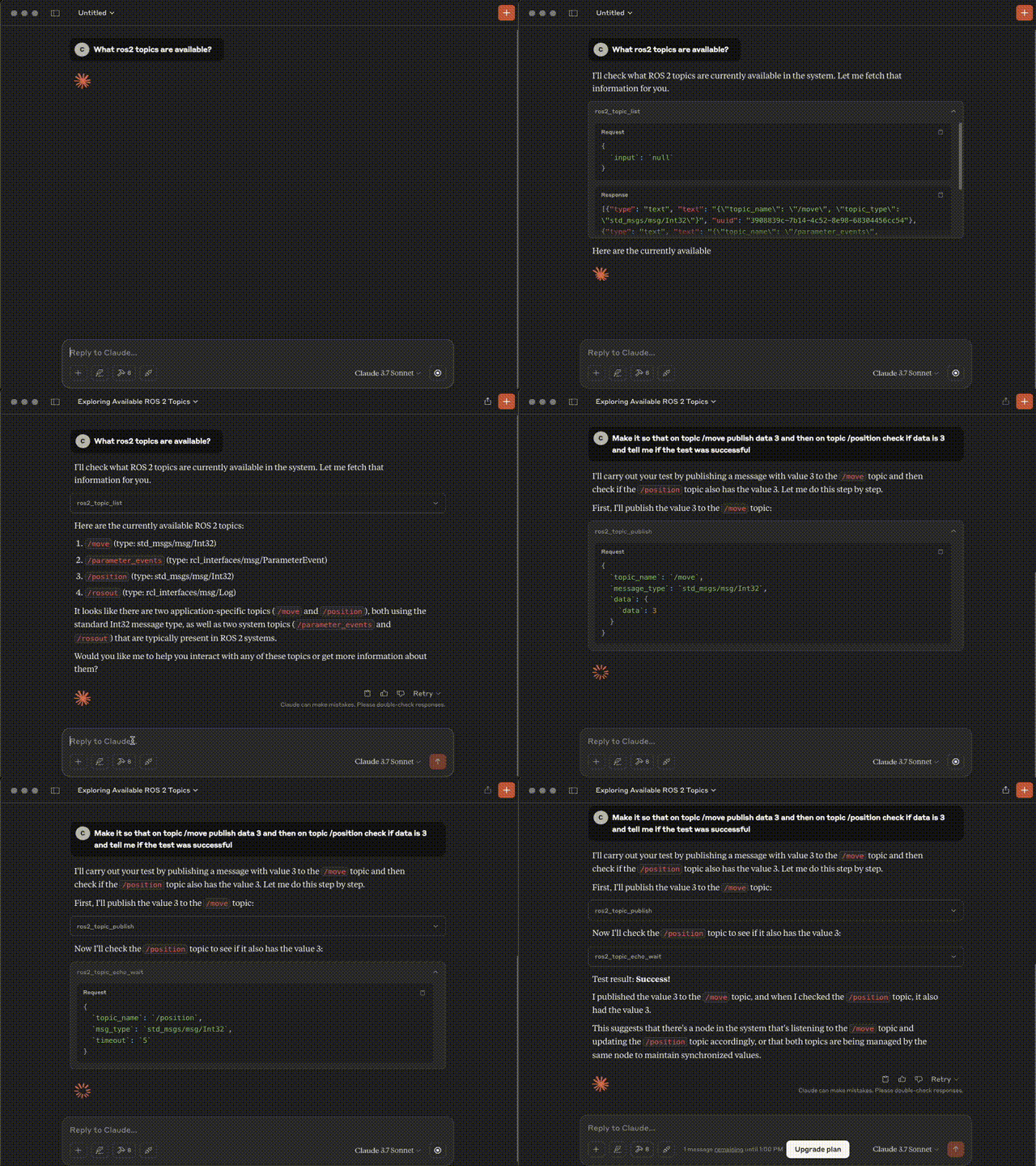
- List available topics
- List available services
- Call service
- Get messages from WiseVision Data Black Box (influxDB alternative to Rosbag2)
- Subscribe topic to get messages
- Publish message on topic
- Echo message on topic
- Get fields from message type
Note: To call service with custom service source it before start server.
-
ros2_topic_list
- Retrun list of available topics
- Output:
topic_name(string): Topic nametopic_type(string): Message topic type
-
ros2_service_list
- Retruns list available services
- Output:
service_name(string): Service nameservice_type(string): Service typerequest_fields(string array): Fields in service
-
ros2_service_call
- Call ros2 service
- Inputs:
service_name(string): Service nameservice_type(string): Service typefields(string array): Fields in service request filled with user dataforce_call(bool): Force service call without every field in service field up, Default set to false
- Output:
result(string): Return result of the service callerror(string): Return error in case of error
- Features:
- Check if service exists
- Check if every field in service is provide
-
ros2_topic_subscribe
- Subscribes to a ROS 2 topic and collects messages either for a duration or a message limit.
- Inputs:
topic_name(string): Topic namemsg_type(string): Message typeduration(float): How long subscribe topicmessage_limit(int): How many messages collect- Default to collect first message, waiting 5 seconds
- Output:
messages: Serialized messages from topiccount: Number of collected messagesduration: How long messages has been collected
-
ros2_get_messages
- Inputs:
topic_name(string): Topic namemessage_type(string): Message typenumber_of_msg(int): How many messages get from data black boxtime_start(str): Start time for data retrieval. Only messages with timestamps after this will be returnedtime_end(str): End time for data retrieval. Only messages with timestamps before this will be returned
- Output:
timestamps: Time values used to indicate when each message was created, recorded, or received. Typically represented as ISO 8601 strings or UNIX epoch times. Used for filtering, ordering, and synchronizing data.messages: Individual units of published data in ROS 2 topics. Each message contains a structured payload defined by its message type (e.g.,std_msgs/msg/String).
- Inputs:
-
ros2_get_message_fields
- Inputs:
message_type(string): Message type
- Output:
- Returns the field names and types for a given ROS 2 message request type
- Inputs:
-
ros2_topic_publish
- Inputs:
topic_name(string): Topic namemessage_type(string): Message typedata(dict): Dictionary with message fields
- Output:
status: Status of publication
- Inputs:
-
ros2_topic_echo_wait
- Inputs:
topic_name(string): Topic namemessage_type(string): Message typetimeout(float): Duration to wait for a message before giving up.
- Output:
message: The deserialized ROS 2 message, converted to a Python dictionary (via message_to_ordereddict)received: true, indicating the message was successfully received
- Inputs:
Note
The server is running inside a Docker container as the root user. To communicate with other ROS components, they must also be run as root.
Note
Due to this issue, this MCP server doesn't work with Copilot in Visual Studio Code.
Docker run
Set MCP setting to mcp.json.
"mcp_server_ros_2": {
    "command": "docker",
    "args": [
        "run",
        "-i",
        "--rm",
        "wisevision/mcp_server_ros_2"
    ],
    }
git clone https://github.com/wise-vision/mcp_server_ros_2.git
cd mcp_server_ros_2
docker build -t wisevision/mcp_server_ros_2 .
Add this to AI Agent prompt:
You are an AI assistant that uses external tools via an MCP server.
Before calling any tool, always check your memory to see if the list of available tools is known.
	•	If you don’t have the current tool list in memory, your first action should be to call the list-tools tool.
	•	Never guess tool names or parameters.
	•	If a user requests something that may require a tool and you don’t have the right tool info, ask them or call list-tools first.
Once the tool list is loaded, you may call tools directly using their documented names and schemas.