


Fire in da houseTop Tip:Paying $100+ per month for Perplexity, MidJourney, Runway, ChatGPT and other tools is crazy - get all your AI tools in one site starting at $15 per month with Galaxy AI Fire in da houseCheck it out free

mcp_nuclei_server

MCP.Pizza Chef: crazyMarky

MCP Nuclei Server is a security scanning server built on the Model Control Protocol (MCP) that enables large language models to perform automated vulnerability scans using Nuclei. It supports configurable template and tag filtering, severity-based vulnerability filtering, and outputs results in JSON format, providing flexible and convenient security scanning integration for developers and security teams.

Use This MCP server To

Automate vulnerability scanning via LLM commands Filter scans by templates and tags for targeted security checks Output scan results in JSON for integration with security dashboards Perform severity-based filtering to prioritize critical vulnerabilities Integrate Nuclei scans into CI/CD pipelines using MCP Enable LLM-driven security audits on web assets

README

MCP Nuclei Server

Python Version License Stars 中文文档

A Nuclei security scanning server based on MCP (Model Control Protocol), providing convenient vulnerability scanning services.

Project Introduction

MCP Nuclei Server is a Nuclei security scanning service developed based on the MCP protocol. It allows large language models to execute Nuclei security scans, supporting various scanning options and result output formats.

Key Features:

  • Support for Nuclei security scanning
  • Configurable template and tag filtering
  • Support for severity-based vulnerability filtering
  • JSON format output results
  • Easy-to-integrate MCP service

Installation Guide

Prerequisites

  • Python 3.8 or higher
  • Nuclei binary (installed and configured)

Installation Steps

  1. Clone the repository:
git clone https://github.com/crazyMarky/mcp_nuclei_server.git
cd mcp_nuclei_server
  1. Install UV and activate environment:
curl -LsSf https://astral.sh/uv/install.sh | sh # Linux/Mac
powershell -ExecutionPolicy ByPass -c "irm https://astral.sh/uv/install.ps1 | iex"  # Windows
  1. Install dependencies:
# Create and activate virtual environment
uv venv
source .venv/bin/activate
# Install mcp related packages
uv pip install mcp

Usage Guide

MCP Configuration (Example for CLINE)

  1. Reference MCP JSON configuration:
{
  "mcpServers": {
    "nuclei_mcp_server": {
      "command": "/path/to/uv", # path to uv
      "args": [
        "--directory",
        "/path/to/nuclei_mcp_server/",
        "run",
        "main.py"
      ],
      "env": {
        "NUCLEI_BIN_PATH": "/path/to/nuclei"
      }
    }
  }
}
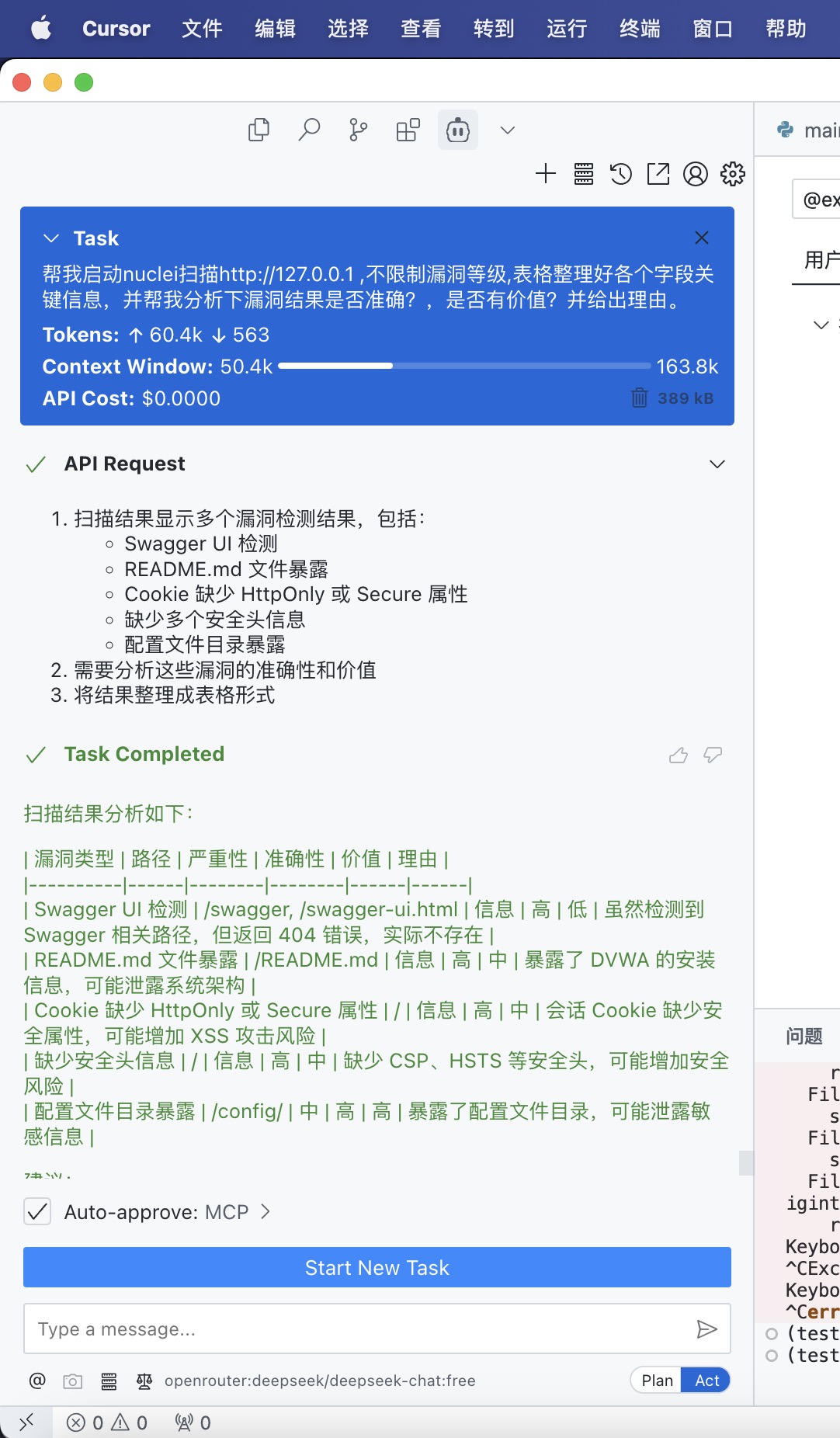
Usage Example

Example

Parameter Description

  • target: Target URL or IP address
  • templates: List of specific templates to use (optional)
  • severity: Vulnerability severity filter (critical, high, medium, low, info)
  • template_tags: Template tag filter (optional)
  • output_format: Output format (default: "json")

Output Format

Scan results are returned in JSON format with the following fields:

{
    "success": true,
    "target": "https://example.com",
    "time_cost_seconds": 10.5,
    "results": [
        {
            "template": "template-name",
            "severity": "high",
            "matched_at": "https://example.com/path",
            "info": {
                "name": "Vulnerability Name",
                "description": "Vulnerability Description"
            }
        }
    ]
}

Contributing

Issues and Pull Requests are welcome!

  1. Fork the project
  2. Create your feature branch (git checkout -b feature/AmazingFeature)
  3. Commit your changes (git commit -m 'Add some AmazingFeature')
  4. Push to the branch (git push origin feature/AmazingFeature)
  5. Open a Pull Request

License

This project is licensed under the MIT License - see the LICENSE file for details

Contact

For any questions or suggestions, please contact us through:

  • Submit an Issue

mcp_nuclei_server FAQ

How do I configure template and tag filtering in MCP Nuclei Server?
You can specify templates and tags in the scan request parameters to customize which vulnerabilities are scanned, allowing targeted security assessments.
What output formats does MCP Nuclei Server support?
The server primarily outputs scan results in JSON format, facilitating easy integration with other tools and automated workflows.
Can MCP Nuclei Server prioritize vulnerabilities by severity?
Yes, it supports severity-based filtering so you can focus on high-risk vulnerabilities first.
Is MCP Nuclei Server compatible with multiple LLM providers?
Yes, it works with any MCP-compatible LLM host, including OpenAI, Anthropic Claude, and Google Gemini.
How do I integrate MCP Nuclei Server into existing security workflows?
You can call the server via MCP clients in your CI/CD pipelines or security platforms to automate vulnerability scanning.
What programming languages is MCP Nuclei Server built with?
It is developed in Python 3.8+, ensuring broad compatibility and ease of deployment.
Does MCP Nuclei Server support real-time scanning?
Yes, it supports real-time scanning requests triggered by LLMs through the MCP protocol.
How secure is the MCP Nuclei Server?
The server follows MCP principles for secure, scoped, and observable interactions, minimizing security risks during scanning operations.